refbook user profile overview

User profile overview

Your profile is the foundation of your refbook account.
There are some key features which are accessed in this section:
  1. PERSONAL DETAILS: this is where all your contact information and referee details are stored, and can be updated at any time.
  2. IDENTIFICATION: upload personal documents such as passport, drivers licence, security cards
  3. ACCREDITATIONS: upload individual documentations relating to non-officiating qualifications (eg: education, medical, finance and legal certifications)
  4. TRAVEL: personal travel frequent flyer information
  5. ORGANISATIONS: summary of your officiating history for each organisation you have joined.
  6. INVOICES: view invoices that have been generated
  7. PAYMENTS: process any registration or payment of fees
  8. NOTIFICATIONS: configure the system notifications
  9. SECURITY: changing login details such as password, email, security questions and verification method.
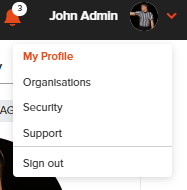
You can access your profile by click on your photo/name in the top right corner, or clicking on the arrow and selecting 'My profile'


    • Related Articles

    • Default availability

      'Default availability' is your underlying availability that are you are able to work. It is the 'typical' weekly schedule you wish to provide assignors that doesn't change regularly. It's important to set a base level of availability, as by default, ...
    • Availability overview

      Refbook allows users to set their personal availability to influence and restrict the ability for their Administrators to assign them. Methods to set availability All availability settings are 'live', meaning that changes are immediately saved and ...
    • Custom Availability

      'Custom Availability' is used for any individual restrictions or amendments you require in your personal calendar. These are typically very specific days/times/other restrictions that you wish to provide (eg: working, injury, studying, holidays, ...
    • Uploading documentation (Australia: Working With Children Check)

      Users can store their Working with Children Check (aka Blue Card) as a Document that can be shared with multiple connected organisations. Note: the requirements of this are specific to each state/territory and the organisations you are connected to. ...
    • Joining organisations

      Refbook allows you to be a member of multiple organisations using your single user profile, without needing seperate login credentials. To join an organisation, users can either be invited by an administrator of the organisation, or make a direct ...
    • Recent Articles

    • Updating availability when Default Organisation Availability applied

      'Default Custom Availability' is an administrator setting enabled by your organisation per competition which overrides Refbook's system default model for availability. When enabled, Default Custom Availability will regard you as always available for ...
    • Setting availability using forms

      Refbook allows you to quickly enter personal availability using special availability forms (including for tournaments and events). Your administrator will have instructed if this method is being used at your competition or event. Depending on how the ...
    • Viewing PDF documents on the mobile app

      When attempting to view/download documents that have been uploaded by organisation, your mobile device needs to have an application locally that supports the file type, such as: Adobe PDF Reader MS Office (Word/Excel) In the phone's settings, a ...
    • Withdrawing from a Family Group

      Go to Contact>Family Groups. This will display a list of all Family Groups you are a member of. Click the delete icon to withdraw from the Family Group and confirm. You will now be removed from the Family Group and cannot be re-added unless the ...
    • Editing Family Group member roles/changing Family Manager

      Adjustment of members inside a Family Group can be performed by a Family Manager at any stage. This can be a common requirement if the roles are changing, or if the Family Group has been incorrectly created (for example: if the official has created ...